Monday, 27 September 2010

Keeping the Cutoff in Tune

Playing around with Native Instruments Massive synth today (truly massive sounds) and was using the filter to create a resonance frequency that added an extra mode to the sound. Heres a little digram and explanation.

Heres my Massive setup!

Next i altered the cutoff frequency so that the resonance frequency could play a melody within the alternating fundamental notes produced from the synth.
Using automation to adjust the cutoff with quite a bit of resonance you can easily create multiple melodies within one synth patch.
Heres the automation

Sunday, 26 September 2010

Uni Starts Tomorrow!

Starting back at Uni again tomorrow so the posts should be a lille more frequent!

Friday, 24 September 2010

Geek Synthesis

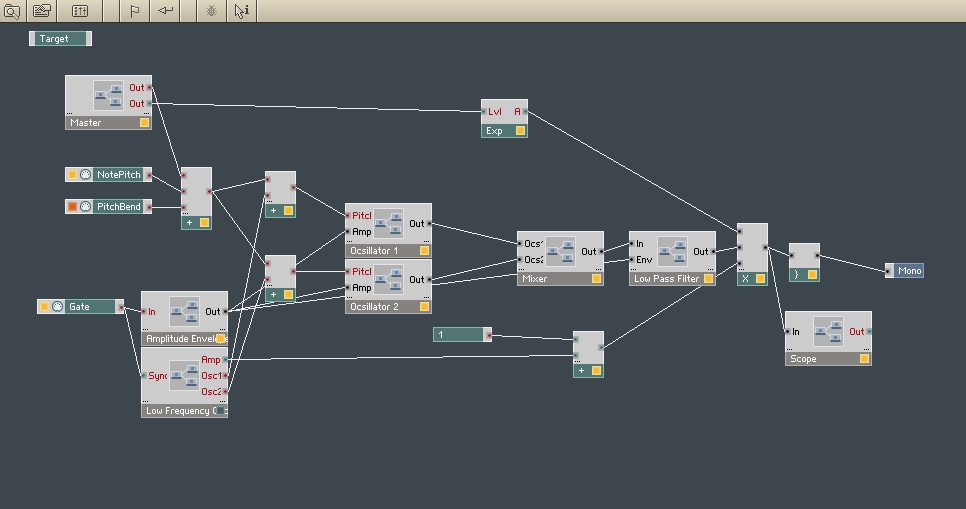
Wanting to learn a bit more about programming synthesizers and effects Reaktor is a good place to start.


I’ve been messing around with Native Instrument's Reaktor for the past couple of days and have merely scratched the surface of its complex and endless possibilities. To get me started i followed this tutorial (http://electrictrumpet.com/SympleSynth/index.htm). This was actually one of those tutorials thats really easy to follow, i everything worked perfectly i didnt have to go back and make any changes to get the thing working.


Heres a screen shot of the synthesizer


It takes you through the basics of creating a synthesizer and has left me wanting to learn more.


Reaktor is amazing! don’t need much programming knowledge and i found its system of Modules, Macros, Instruments, and Ensembles really easy to pick up and understand.


Heres a screen shot of the synthesizer’s structure


The ability to create macros that can contain modules really tidies up the structure of your instrument and makes it easy to each part of the synthesizer.


This is the structure of the oscillator 1 macro


I want to look into Outsim’s synth maker and also Synthedit, witch are both well known programs!

Tuesday, 21 September 2010

Reverb Fight!

Two reverb signals can often fight for space in the mix and end up clashing, creating a swirl of echo’y muddiness. I’ve been experimenting with side chain compression on the reverb auxiliaries to hold one reverb back while another takes over.


In this case i have a snare track and a vocal track each with a send at 0dB to SpaceDesigners each with a different setting (snare at a time of 1.2s and vocals at 2s)


I noticed that when the snare is played the reverb from the vocals clashes with the snare reverb and really muddies the mix. May be i could just dial down the reverb sends however the reverb in this mix was necessary for effect.


Solution

I put a compressor on the vocal reverb auxiliary with a side chain fed from the snare. The compressor has a threshold of -50dB and a ratio of 20:1 so this is basically limiting rather than compression however it is the release time that allows the reverb signal to slowly creep back in that is important.


So every time the snare is played the side chain ducks the vocal reverb, allowing the snare reverb to cut through!


Evaluation

The mix is a lot clearer and the vocals sound crisp over the snare

Saturday, 11 September 2010

Packing up and downsizing my mixer!

Im going away to uni and don't really want to take my Mackie 1604 VLZ so I've been looking around for a small 2 to 6 channel mixer, just to record some guitar and provide a balanced output for my monitors.

Maybe I could just spend £40 on something from Behringer's xenyx range but i fear sound quality and durability will suffer.

I came across this from Soundcraft and think it will do the job for me!


Its fully analogue and has the same pre's as their reputable Gb series mixers.

Confussed!

Here is my problem, recording a sine wave through my mixer, soundcard, and into my DAW. All at unity gain 0dB. Recorded the signal and then played it back out the DAW at 0dB into the mixer at unity gain on the channel pre and unity gain on the channel fader. I was then getting +7dB on my master buss. Somehow, somewhere between leaving the computer and entering the mixer there had been an increase in gain and i had no idea where it came from!
Heres some pics, (poor quality i know)

So i searched the internet for answers and didn't really find one, i even posted a question on gearslutz forum about it, lots of views but no replies!
I finally stumbled upon a document on http://www.popmusic.dk/links-us.html titled Levels in Digital Audio so i had a read and discovered this. From © 2010 Popmusic.dk, written by Holger Lagerfeldt.
So problem solved!

Thursday, 9 September 2010

I want one!

The Symphony I/O by Apogee


Apogee's latest interface for the mac is in a class of its own, heres some specs.
  • Flexible design architecture with a base unit and two I/O module slots
  • Up to 32 channels of I/O per unit
  • Future proof connectivity with PCI, USB, Ethernet and all popular digital formats
  • Compatibility with Logic, Pro Tools HD, Pro Tools LE and any Core Audio driven application
  • Total software control of Symphony I/O with Maestro

The fact that this can be used with logic and pro tools sells this for me, i'm gona get saving!